Why CSSCAN
A Smarter Way to Run Security Checks
Agentless deployment, unified visibility, intuitive management, and AI-powered reporting.
01
Agentless
Fast Security Checks, No Agent Required
Run remote security checks without installing agents, reducing deployment time and operational overhead.
check_circle
Agentless remote security checks
check_circle
Fast deployment and immediate use
check_circle
Minimal impact on system performance
check_circle
Lower operational and maintenance costs
02
Multi-Platform Support
Manage Multiple Platforms in One Place
Assess Windows, Linux, and major databases through a single platform.
check_circle
Windows and Linux support
check_circle
Oracle, MySQL, and Microsoft SQL Server support
check_circle
Unified security assessment across infrastructure
check_circle
Consistent operations across diverse environments
03
User-friendly UI
Intuitive Security Dashboard
Understand complex security data quickly with a clear, intuitive dashboard.
check_circle
Intuitive dashboard
check_circle
User-friendly interface
check_circle
Responsive across devices
check_circle
Fast security posture analysis
04
AI-powered Reporting
Automate Security Reporting with AI
Turn assessment results into structured reports automatically and reduce time spent on manual reporting.
check_circle
AI-powered report generation
check_circle
Multiple report templates
check_circle
Reports aligned with security standards
check_circle
Audit and compliance support
CSSCAN In Action
From Asset Registration to Security Assessment and Reporting
CSSCAN assesses the security posture of servers and database environments without requiring agent installation, delivering actionable results that operators can use immediately.
STEP 01
monitoring
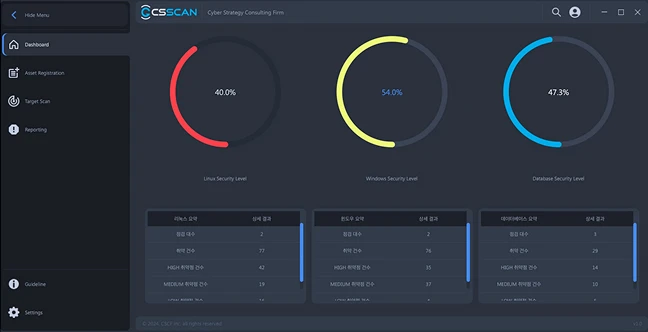
Dashboard
check_circle
View security scores and assessment status for each asset
check_circle
Visualize vulnerability risk levels with color-coded charts
check_circle
Track scan progress and results in real time
check_circle
Get an at-a-glance view of your overall security posture
CSSCAN · Dashboard
STEP 02
inventory_2
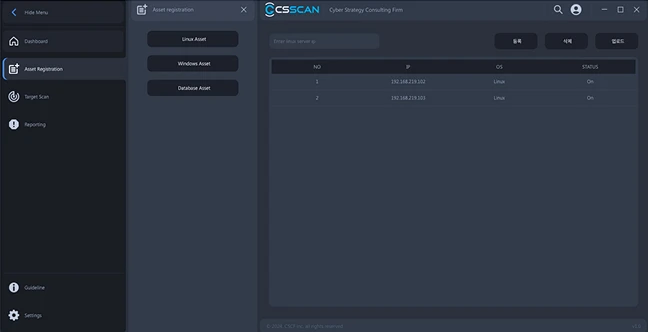
Asset Management
check_circle
Register and manage server and database assets
check_circle
Manage Windows, Linux, Oracle, MySQL, and MSSQL environments
check_circle
View status and configuration details for each assessment target
check_circle
Manage multiple assets systematically from a centralized platform
CSSCAN · Asset Management
STEP 03
track_changes
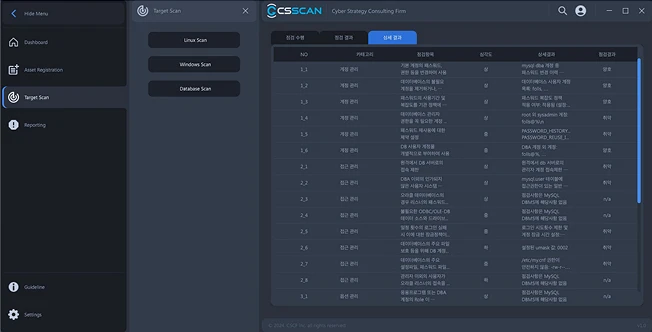
Target Scan
check_circle
Run fast, agentless security assessments
check_circle
Select assessment items by OS and database environment
check_circle
Perform remote assessments with minimal impact on server resources
check_circle
Identify vulnerable configurations and recommended improvements from scan results
CSSCAN · Target Scan
STEP 04
description
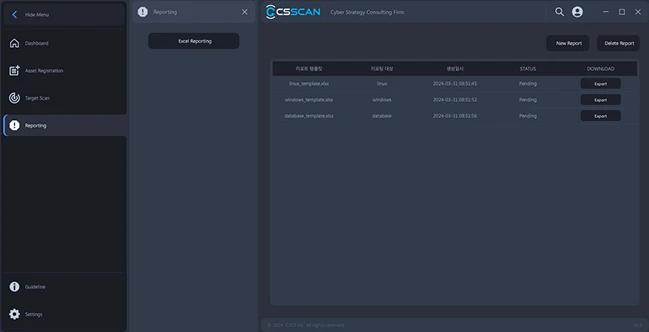
Reporting
check_circle
Generate detailed reports based on assessment results
check_circle
Share security status quickly with summary reports
check_circle
Use reports as supporting evidence for audits and compliance
check_circle
Receive AI-generated remediation recommendations for identified vulnerabilities
CSSCAN · Reporting